Expense Tracker PDF Interior Layout: A Practical Design Asset
If you have ever tried to build a simple spending log for yourself or a client, you quickly realize that layout matters far more than most people expect. A blank page with a few lines sounds easy, but once you start tracking daily coffee runs, subscription fees, and irregular freelance payments, the lack of structure becomes a real friction point. That is exactly where a thoughtfully designed expense tracker PDF interior layout changes the game. This is not just a set of printable pages. It is a carefully constructed system that balances clarity, flexibility, and visual calm.
What This Layout Really Offers
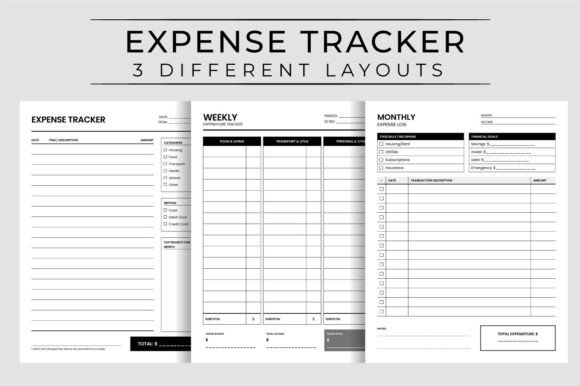
At its core, the expense tracker PDF interior layout provides three distinct layout variations, each contained in its own PDF file and corresponding JPG preview. Every PDF runs 120 pages long, which gives you plenty of room to print a full month or two of tracking without flipping back and forth. The trim size is a standard 8.5″ x 11″ with no bleed, making it a straightforward ready to upload option for Amazon KDP or any print-on-demand service. The 300 dpi resolution means clean, crisp lines whether you print at home or send it to a commercial printer.
What stands out visually is the restraint. These layouts avoid heavy decorative elements that waste ink and distract from the actual numbers. Instead, you get clean column structures, subtle spacing cues, and a clear hierarchy that guides the eye from date to description to amount. The personality here is functional without feeling cold. It feels like something a thoughtful accountant or a productivity-focused designer would create, not a generic spreadsheet dumped onto a page.
Three Layouts, Three Use Cases
The three different layouts are not just cosmetic variations. They address different tracking styles:
- Layout A follows a traditional ledger style with sequential rows, ideal for people who prefer a chronological log and want to see spending patterns over time at a glance.
- Layout B groups expenses by category, which works well for small business owners or freelancers who need to separate business costs from personal ones without flipping through multiple pages.
- Layout C is a hybrid with extra note space and a running balance column, designed for hobbyists or anyone who likes to scribble context alongside their numbers.
Having all three in one interior means you can pick the right tool for the right project, or even mix them within the same notebook if you are binding your own copy.
Where This Type of Layout Works Best
The real strength of a well-crafted expense tracker PDF interior layout lies in its versatility across different audiences and use cases. For content creators and bloggers, this makes an excellent lead magnet or bonus download. If you run a personal finance blog, offering a free printable spending log as a PDF is a low-cost, high-value way to grow your email list. The high resolution and clean print quality mean your audience will actually use it and recommend it to others.
For designers and publishers working on Amazon KDP, this interior is essentially ready to upload. The 120-page length hits a sweet spot. It is thick enough to feel substantial in hand but not so long that printing costs eat your margin. The no-bleed format also simplifies the upload process because you do not have to worry about trimming or alignment issues common with bleed-heavy interiors.
Small business owners and freelancers can print these pages for internal use. Whether you track project expenses, mileage, or reimbursable client costs, having a structured log reduces the mental load of remembering where every dollar went. The blank expense notes printable page in Layout C is particularly useful for recording context that numbers alone miss, like which client meeting generated that lunch receipt.
How Layout Influences Readability and Habit
One often overlooked aspect of a spending log is how its layout affects whether people actually keep using it. A cluttered or confusing expense tracker PDF interior layout leads to abandoned logs by day three. What makes this set effective is the attention to visual hierarchy. Column headers are clearly distinguished from data rows without heavy borders. Spacing is generous enough to handwrite legibly but tight enough to fit a full day's entries on one page.
From a brand perception standpoint, if you are publishing this under a brand name, the clean layout communicates reliability and attention to detail. It signals that you respect your customer's time and want them to succeed at their goal, not just fill pages. That subtle trust building matters enormously in a market flooded with hastily thrown-together printables.
Readability Considerations for Print
Because these files are designed at 300 dpi with a standard 8.5″ x 11″ size, the readability is excellent even for users with average vision. There is no reliance on color coding, which means the logs remain usable after black-and-white printing. This is a small but critical detail for budget-conscious users who do not want to print color pages just to track their lunch spending.
If you are a designer customizing these interiors for a client, the clean base allows you to add your own branding elements, whether that is a logo header, a custom color palette, or additional instructional pages. The file structure gives you three JPG previews per layout, which is helpful for showing mockups before committing to a full print run.
Choosing and Evaluating the Right Layout for Your Project
When you evaluate whether a specific expense tracker PDF interior layout fits your project, start by considering your end user. Are they a disciplined daily tracker who wants minimal distractions? Layout A with its straightforward rows will serve them best. Are they a visual thinker who needs categories and notes? Layout C will reduce their friction significantly.
For KDP publishers, the perfect interior size for kdp specification is a major time saver. Because the dimensions are exactly 8.5″ x 11″ with no bleed, you can upload the PDF directly without reformatting or adjusting margins. This eliminates one of the most frustrating parts of the self-publishing process. The 120-page count is also within a comfortable cost range for most price tiers, allowing you to hit a competitive retail price while maintaining a healthy royalty.
Customizability and Licensing
One practical consideration is whether you have the freedom to modify the files. This interior comes as PDF and JPG, which means you can edit the JPGs in image editing software if you need to add your own headers, logos, or instructional text. The ready to upload nature of the PDFs means you can also use them as-is. For commercial licensing, verify the terms of your specific purchase, but interiors like this are generally licensed for commercial use in products you sell, such as notebooks, planners, or digital downloads.
If you plan to offer this as a printable on Etsy or as a bonus for a course, the three-layout variety gives you multiple product options from one purchase. You can sell each layout individually, bundle them, or even offer one as a freebie to drive traffic to your paid products.
Practical Recommendations for Best Results
Based on real-world use with similar interiors, here are a few things I have observed:
- Test print one page first. Even with 300 dpi, printer calibration varies. Print a single page of each layout to confirm margins and contrast look right before committing to a full run.
- Consider paper weight. For a spending log that gets carried in a bag, 70 lb or 80 lb paper holds up better to frequent writing and erasing. Standard 20 lb copy paper works fine for home use but may show ink bleed from some pens.
- Think about binding. If you are selling a physical book, coil binding or disc binding allows the pages to lie flat, which is a huge convenience for anyone writing in it. Perfect binding works but may require pressing the book open.
- Add a instruction page. Even a clean layout benefits from a one-page guide explaining how to use each column and how often to update the log. It increases perceived value and reduces support questions.
Examples of Realistic Applications
A blogger in the personal finance niche might offer Layout B as a free download in exchange for email signups. A small business coach could print Layout C and include it in a client onboarding kit. A crafty hobbyist selling handmade planners on Etsy could use Layout A as the expense section of a larger planner, customizing the cover and adding dividers.
For marketers and brand strategists, the consistent, professional look of these pages supports a cohesive brand identity. If your brand voice is minimal, organized, and trustworthy, this interior aligns with that perception naturally. There is no mismatch between a flashy, decorative cover and a chaotic interior.
Final Thoughts on Making This Work for You
The expense tracker PDF interior layout is a practical, flexible asset that serves both personal tracking needs and commercial publishing goals. Its strength lies in the balance between structure and simplicity. Whether you are a content creator building a product library, a designer assembling a client project, or a publisher uploading to KDP, the three layouts give you room to tailor the experience without reinventing the wheel.
Focus on who will use the pages and what they need from the experience. The layout is your tool, not your message. When the design fades into the background and the tracking becomes effortless, you have done your job well. That is the real value of a thoughtfully built interior, and exactly what this set delivers.