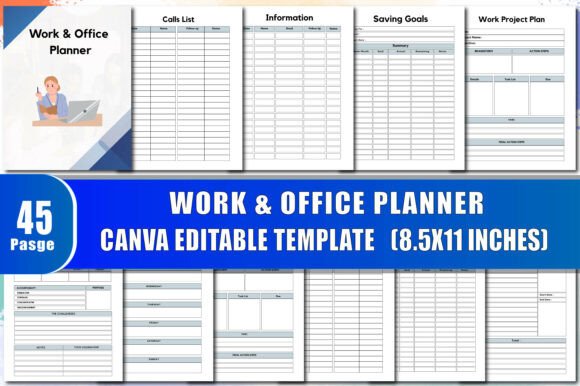
Work Office Planner: Your All-in-One Tool for Organized Productivity
In today’s fast-paced work environment, staying on top of your responsibilities can feel like a full-time job in itself. Between managing appointments, tracking deadlines, following up with leads, and planning your week, it’s easy to get overwhelmed. That’s where a dedicated Work Office Planner becomes your most valuable ally. Whether you’re a solopreneur, a busy manager, or a team leader looking to streamline your daily operations, having a structured system for organizing your professional life can transform how you work.
The Work Office Planner is more than just a calendar or a task list. It’s a comprehensive productivity system designed to help you take control of your day, your projects, and your business goals. With 45 pages of ready-to-use templates and the flexibility to edit everything on Canva, this planner adapts to your unique workflow. Let’s explore how this tool can help you overcome common challenges and achieve greater efficiency.
What Makes a Work Office Planner Essential?
Many professionals struggle with scattered notes, missed deadlines, and the constant stress of juggling too many tasks. They might use separate apps for appointments, reminders, and project tracking, but these tools rarely work together seamlessly. The result is fragmented information that leads to errors and lost time.
A Work Office Planner centralizes all your planning needs into one place. It combines a weekly schedule, deadline tracker, meeting notes, lead follow-ups, and even a budget section. By having everything in one cohesive document, you reduce mental clutter and create a single source of truth for your work life. This is especially useful for anyone who needs to switch contexts quickly—for example, moving from a client meeting to a project review without missing details.
How the Work Office Planner Addresses Real Challenges
Imagine you’re a freelance consultant handling multiple clients. You have appointments scheduled, deadlines for deliverables, a list of potential leads to contact, and a project plan that needs daily updates. Without a clear system, something will slip. The Work Office Planner helps you segment each area of your work with dedicated pages:
- Appointment Schedule & Calls List – Keep track of meetings and phone conversations with clear time slots.
- Deadlines List & Lead Follow-up – Never miss a critical due date or a follow-up opportunity.
- Work Project Plan & Meeting Minutes – Document project milestones and record key decisions from discussions.
- Daily Plan & Weekly Planner – Break down large projects into daily actions and review your week at a glance.
These features address the common pain point of information overload. Instead of storing notes in multiple notebooks or digital files, you have one structured layout that guides you through each step. The result is a clearer path from goal setting to completion.
Practical Applications and Tangible Outcomes
The true value of a Work Office Planner lies in how you use it. Consider these scenarios where the planner makes a measurable difference:
Effective Time Management for Busy Professionals
If you find yourself constantly reactive—responding to emails and requests instead of working on priorities—the planner’s Daily Goals and To Do List help you refocus. By writing down your top three priorities each morning, you shift from busywork to meaningful progress. The Weekly Schedule lets you block time for deep work, while the Monthly Budget page ensures you keep an eye on business expenses without neglecting your other tasks.
Business Growth and Planning
For small business owners, the Business Overview and Business Expansion pages are especially valuable. You can map out your vision, set quarterly goals, and track key metrics like income and expenses. The Snowball Tracker and Saving Goals sections help you manage cash flow and plan for reinvestment. This isn’t just to-do list; it’s a strategic tool that aligns daily actions with long-term objectives.
Project Management Without the Complexity
Not everyone needs a full project management software. For many workers, a simple Project Schedule and Project Vision page is enough to keep initiatives on track. The Work Project Plan layout allows you to define tasks, assign owners, and note deadlines. Whether you’re launching a new product or organizing an office move, this section keeps everyone accountable.
Who Benefits Most from a Work Office Planner?
While any professional can use this planner, certain roles see immediate improvements:
- Freelancers and Solopreneurs – Need to manage multiple clients, invoices, and deadlines without a support team. The Order Form and Simple Inventory pages help track services and supplies.
- Team Leaders and Managers – Use the Meeting Minutes and Lead Follow-up to delegate tasks and stay on top of sales pipelines.
- Remote Workers – Benefit from a structured daily plan that separates work from personal time. The Vision Board section can keep motivation high.
- Administrative Professionals – Rely on the Bill Checklist and Expenses Tracker for office finances and inventory management.
The key is that each user can customize the planner to fit their specific needs. Because it’s editable on Canva, you can add or remove pages, change colors, adjust text, and rearrange sections without starting from scratch. This flexibility ensures the planner grows with your business.
Making the Most of Your Work Office Planner
To get the best results, consider these recommendations:
- Start with the essentials – Fill out the This Planner Belongs To page and your Information section. This personalizes the planner and reminds you of your purpose.
- Set up weekly and daily routines – Use the Weekly Planner every Sunday to plan the upcoming week. Each morning, highlight your top three tasks in the Daily Plan or Work To-Do List.
- Review monthly – The Monthly Evaluation and Smart Goals pages let you reflect on what worked and adjust your strategies. Pair this with the Income Tracker and Expenses Tracker to stay financially healthy.
- Use the vision tools – The My Vision Board and Project Vision pages are not just decoration. They help you visualize your end goals, which boosts motivation and decision-making.
- Print or keep digital – Since the planner comes in a high quality print-ready PDF (300 DPI, no bleed), you can print it and bind it, or keep it as a digital fillable PDF. The Canva editing means you can reuse the template month after month.
Why Choose a Canva-Integrated Work Office Planner?
One standout feature of this Work Office Planner is its Canva Interior. This means you don’t need advanced design skills to make it your own. Many planners offer fixed layouts, but a Canva-editable planner puts you in control. You can:
- Add your company logo or branding colors.
- Adjust font sizes for readability.
- Move or delete pages that aren’t relevant to your role.
- Duplicate pages you use frequently, like the Meeting Schedules or Calls List.
This level of customization ensures that the planner remains relevant as your responsibilities evolve. For example, if you start a new project halfway through the year, you can add more Work Project Plan pages without having to buy a new planner.
Ready for Amazon KDP and Professional Printing
If you’re planning to sell this planner as a product—or simply want a polished personal copy—the Work Office Planner is designed for Amazon KDP upload. The no-bleed format and 300 DPI resolution guarantee crisp print quality. You can also edit the PDF in Canva before publishing, ensuring that your interior matches your cover perfectly. This makes it an excellent choice for creators who want to offer a valuable resource to their audience.
Building Lasting Productivity Habits
Using a planner is only effective if you stick with it. The Work Office Planner encourages consistency through its thoughtful structure. Features like Weekly Meal Plan and Saving Tracker add elements of self-care that many professionals neglect. By integrating health and finances into your work planner, you treat yourself as a whole person, not just a machine that produces output.
The Important Notes and Notes pages at the end are perfect for capturing spontaneous ideas. They act as a safety net for thoughts that don’t fit into other categories. Combined with the Vision Board, these pages support a creative approach to problem-solving.
Final Thoughts
An organized workspace starts with an organized mind, and an organized mind benefits from a reliable tool. The Work Office Planner offers exactly that: a practical, customizable system that addresses the real needs of today’s professionals. From managing daily tasks to plotting long-term business expansion, every page has a purpose. Whether you’re using it for yourself or creating a product for others, the combination of comprehensive features and Canva flexibility makes this planner a standout choice.
Take the first step toward less stress and more accomplishment. Explore how the Work Office Planner can fit into your routine, and discover the clarity that comes from having everything in one place.